Openai/696d8ed5-9080-800d-b244-3df089f071b9
This conversation was exported from ChatGPT[1]
gpt-5-2 edit
User: My friend on Facebook asked this edit
My friend on Facebook asked this Who knows how to record Audibles? I want to do my own but I need help.
Assistant: Here’s a clear, non-judgmental reply you can post that both answers the question and keeps them out of trouble: edit
Here’s a clear, non-judgmental reply you can post that both answers the question and keeps them out of trouble:
Recording Audible audiobooks directly is not allowed (they’re DRM-protected and recording them violates Audible/Amazon’s terms and copyright law).
That said, there are legal ways to do what people usually mean when they ask this. It depends on what they want to accomplish:
That’s 100% allowed and pretty straightforward: edit
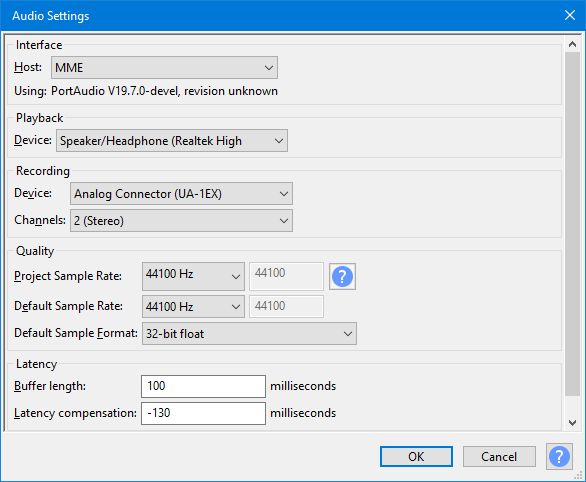
!https://m\.media\-amazon\.com/images/I/716T4UcOgDL\.jpg[2] !https://manual\.audacityteam\.org/m/images/5/5e/audio\_settings\_dialog\_with\_usb\_input\.png[3] !https://www\.reaper\.fm/v7img/ss\_persp\_v7\.jpg[4] 4 What they need:


- A USB mic (Blue Yeti, Samson Q2U, Audio-Technica AT2020)
- Free software like Audacity (Windows/Mac) or GarageBand (Mac) or Reaper (paid but cheap)
- A quiet room + soft furnishings (closet works great)
Workflow:
- Plug in mic
- Record WAV/MP3
- Light noise reduction
- Export chapters
They must: edit
- Own the rights or
- Use public-domain books (Project Gutenberg, LibriVox)
Totally legal and common.
That’s not legal, even for “personal use.” edit
Audible files are DRM-locked and bypassing that can:
- Violate copyright law
- Get their Audible account banned
- Be illegal in some regions
If they want audio without Audible: edit
!https://is1\-ssl\.mzstatic\.com/image/thumb/Purple221/v4/c6/08/30/c60830f9\-83a9\-6750\-df51\-98b5aca52697/Icon\-Free\-0\-1x\_U007emarketing\-0\-11\-0\-0\-85\-220\-0\.png/1200x630wa\.png[5] !https://d1krbhyfejrtpz\.cloudfront\.net/blog/wp\-content/uploads/2023/07/11144704/AI\-Text\-to\-Speech\-App\-Development\-Features\-Tech\-Stack\-and\-Process\.jpg[6] !https://i\.insider\.com/5f063d963f737008c91b6f43?auto=webp&format=jpeg&width=800[7]


- LibriVox – free human-read audiobooks (public domain)
- Text-to-Speech apps for ebooks they own
- Kindle’s built-in Text-to-Speech (if enabled)
If you want something quick and polite: edit
If you want, tell me:
- Are they trying to narrate something?
- Podcast style or full audiobook?
- Phone or computer?
I can give them a super simple starter setup.
User: She's an author edit
She's an author
Assistant: Perfect — then here’s a clean, supportive reply you can post that’s tailored exactly for an author and avoids any copyr… edit
Perfect — then here’s a clean, supportive reply you can post that’s tailored exactly for an author and avoids any copyright confusion:
If you’re an author, you don’t record through Audible itself 😊 You record your own audiobook and then upload it.
!https://www\.authorimprints\.com/wp\-content/uploads/2021/03/Home\-Recording\-Studio\-Featured\-Image\.jpg[8] !https://images\.ctfassets\.net/f4cbid0mhigx/1Aq8RDW5EZbkbdVwwKmpQg/0ef91254515f8c390f6e759f41103782/adobestock\_2980931252\.jpeg[9] !https://blog\.tcea\.org/wp\-content/uploads/2023/01/Theme\_Dark\.png[10] 4


Simple author-friendly setup edit
Gear
- USB mic (Audio-Technica AT2020 USB, Samson Q2U, Blue Yeti)
- Headphones
- Quiet room / closet with clothes = great sound treatment
Software
- Audacity (free, Windows/Mac)
- GarageBand (Mac)
- Reaper (cheap, very good)
Recording
- Record chapter-by-chapter
- Save as WAV
- Light noise reduction + compression
How it gets on Audible edit
Authors publish audiobooks to Audible through ACX (Audiobook Creation Exchange).
ACX handles:
- Audible
- Amazon
- Apple Books (audiobooks)
She can:
- Narrate it herself
- Or hire a narrator
- Or split royalties
ACX has very specific audio requirements (RMS levels, noise floor, spacing), but Audacity presets make this manageable.
Ultra-short FB reply (pasteable) edit
- If you’re an author, you record your own audiobook (mic + Audacity), then upload it to ACX, which distributes to Audible/Amazon. You don’t record Audible files directly.
If you want, I can:
- Recommend a mic based on her budget
- Share Audacity settings that pass ACX review
- Outline the exact ACX checklist so she avoids rejections
Just say the word 👍
References edit
- ↑ "Author Audiobook Recording Guide". ChatGPT. Retrieved 2026-01-20.
- ↑ "https://m\.media\-amazon\.com/images/I/716T4UcOgDL\.jpg". m.media-amazon.com. Retrieved 2026-01-20.
{{cite web}}: External link in|title= - ↑ "https://manual\.audacityteam\.org/m/images/5/5e/audio\_settings\_dialog\_with\_usb\_input\.png". manual.audacityteam.org. Retrieved 2026-01-20.
{{cite web}}: External link in|title= - ↑ "https://www\.reaper\.fm/v7img/ss\_persp\_v7\.jpg". reaper.fm. Retrieved 2026-01-20.
{{cite web}}: External link in|title= - ↑ "https://is1\-ssl\.mzstatic\.com/image/thumb/Purple221/v4/c6/08/30/c60830f9\-83a9\-6750\-df51\-98b5aca52697/Icon\-Free\-0\-1x\_U007emarketing\-0\-11\-0\-0\-85\-220\-0\.png/1200x630wa\.png". is1-ssl.mzstatic.com. Retrieved 2026-01-20.
{{cite web}}: External link in|title= - ↑ "https://d1krbhyfejrtpz\.cloudfront\.net/blog/wp\-content/uploads/2023/07/11144704/AI\-Text\-to\-Speech\-App\-Development\-Features\-Tech\-Stack\-and\-Process\.jpg". d1krbhyfejrtpz.cloudfront.net. Retrieved 2026-01-20.
{{cite web}}: External link in|title= - ↑ "https://i\.insider\.com/5f063d963f737008c91b6f43?auto=webp&format=jpeg&width=800". i.insider.com. Retrieved 2026-01-20.
{{cite web}}: External link in|title= - ↑ "https://www\.authorimprints\.com/wp\-content/uploads/2021/03/Home\-Recording\-Studio\-Featured\-Image\.jpg". images.openai.com. Retrieved 2026-01-20.
{{cite web}}: External link in|title= - ↑ "https://images\.ctfassets\.net/f4cbid0mhigx/1Aq8RDW5EZbkbdVwwKmpQg/0ef91254515f8c390f6e759f41103782/adobestock\_2980931252\.jpeg". images.openai.com. Retrieved 2026-01-20.
{{cite web}}: External link in|title= - ↑ "https://blog\.tcea\.org/wp\-content/uploads/2023/01/Theme\_Dark\.png". images.openai.com. Retrieved 2026-01-20.
{{cite web}}: External link in|title=